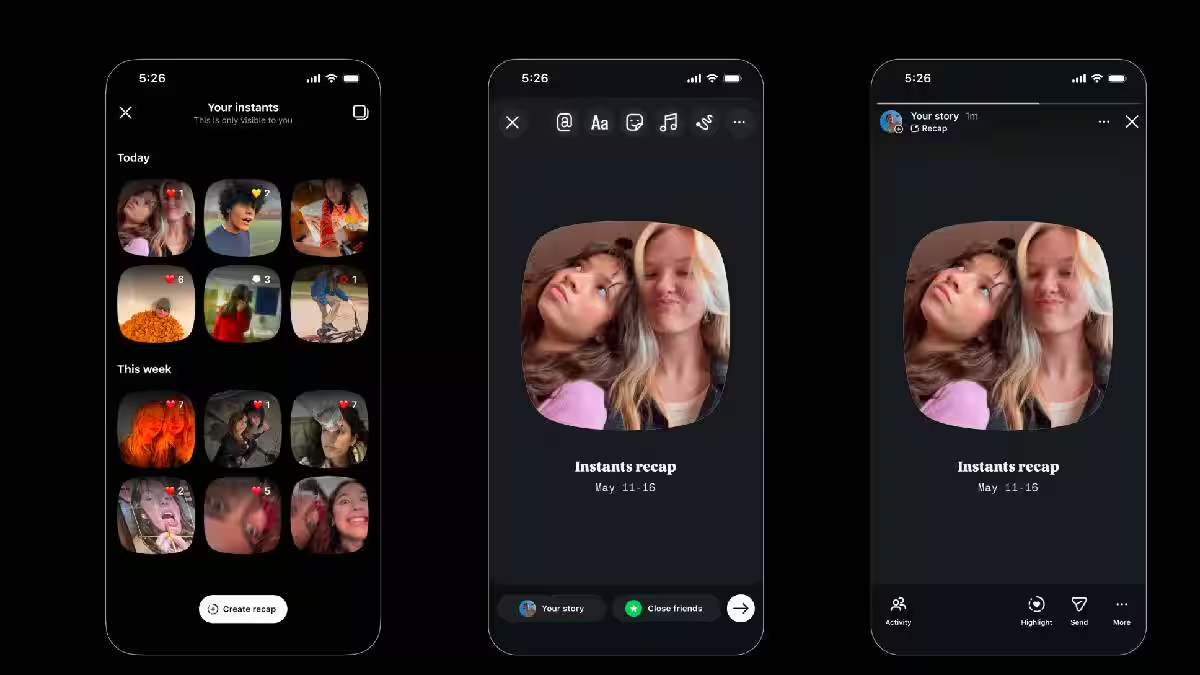
Instagram users are rushing to disable the platform’s new “Instants” feature after accidental photo shares sparked widespread privacy concerns online
Instagram recently introduced a new built-in feature designed for capturing and sharing unedited, real-life moments as they happen. The feature is accessible directly through messages as well as via a standalone application. However, ever since its rollout on Wednesday, the internet has been flooded with reports of users unintentionally sharing their pictures.
These embarrassing situations have led many users to look for ways to disable the new feature.
Instants appear as a small stack of photos in the bottom-right corner of a user’s inbox. Users can tap on the photo stack to view what others have shared, after which a camera tab opens, allowing them to share their own photos. Instagram also offers a brief tutorial on how to use Instants the first time a user clicks on the photo stack.
On the camera page, users can manually choose whether their photo is shared with “Friends” or “Close Friends.” The moment a user taps either of these buttons, the photo is instantly shared with the selected group.
Only users on your Friends or Close Friends list can view your Instants. Unlike Stories, which remain visible for 24 hours, users cannot see who has viewed their Instant unless someone replies with an Instant of their own.
How to Undo an Unintentional Instant
If you regret sharing an Instant, all you need to do is tap the “Undo” button that appears at the bottom of the screen immediately after sharing it. However, this must be done within seconds of posting.
Users can also delete individual Instants from the archive where they are stored. To access the archive, tap the four-square icon in the top-right corner of the Instants page. From there, simply select the Instant you want to delete.
Additionally, users can disable Instants through the Settings and Activity tab. Under the “What You See” section, select “Content Preferences” and then tap the “Hide Instants” option.
Users can also snooze Instants directly from their inbox, which is a much simpler option. All you need to do is press and hold the Instant pop-up and swipe right. You can swipe left at any time to bring them back.
First Published:
May 17, 2026, 18:00 IST
End of Article


