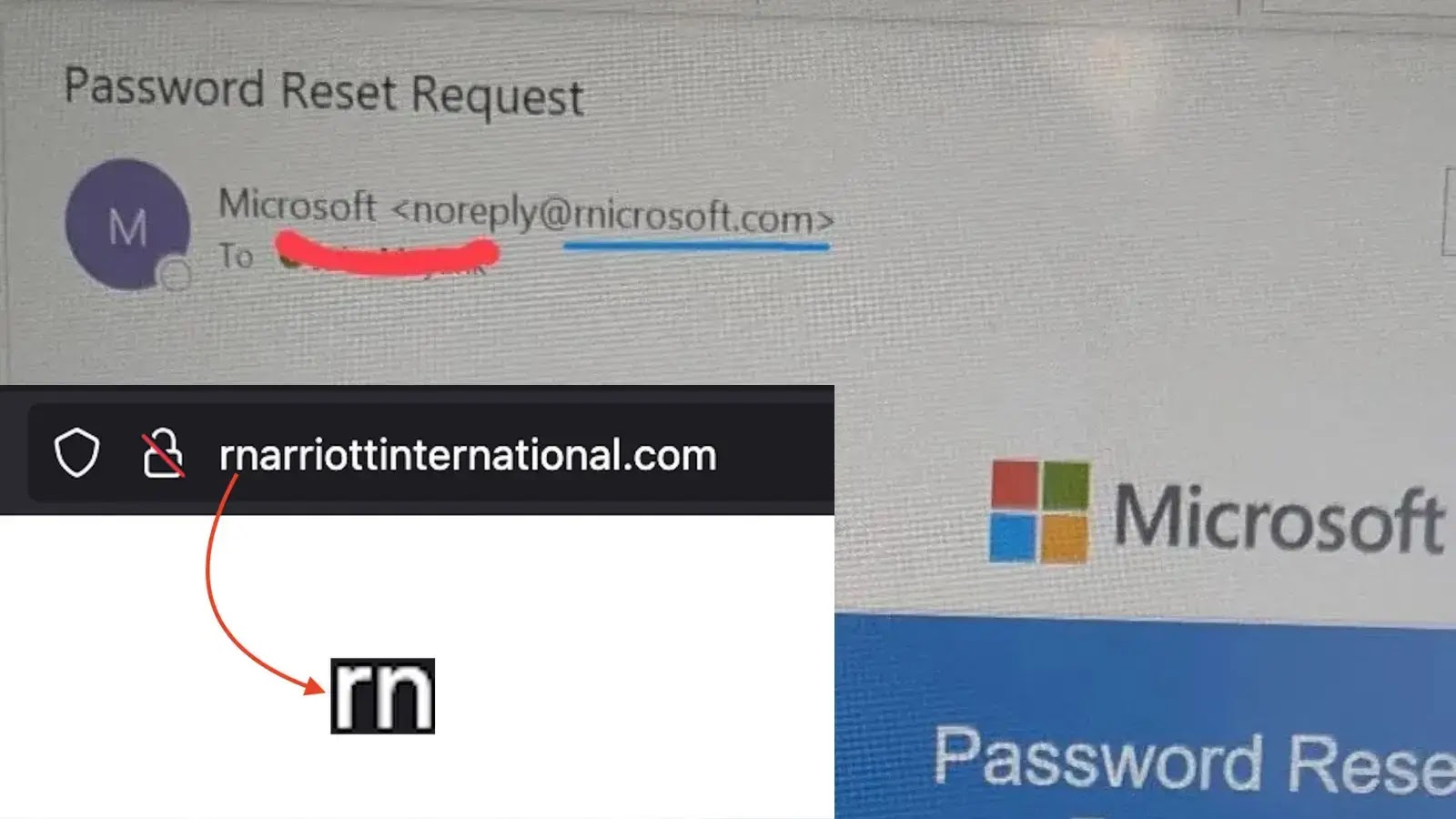
A sophisticated homoglyph phishing campaign is targeting customers of Marriott International and Microsoft by exploiting a visual trick in typography.
Attackers are registering domains that replace the letter “m” with the character combination “rn” (r + n), creating fake websites that appear nearly identical to legitimate ones at first glance.
This technique leverages how modern fonts render text. In many typefaces, the letters “r” and “n” positioned together (rn) look virtually indistinguishable from the letter “m,” a vulnerability that cybercriminals are weaponizing with alarming effectiveness.
When users quickly scan a URL like rnarriottinternational.com, their brain often “autocorrects” the visual input, subconsciously reading “m” instead of “rn.” This cognitive shortcut is precisely what attackers exploit.
Marriott International Under Siege
Security researchers at Netcraft recently identified a cluster of malicious domains attempting to impersonate the hospitality giant.
These phishing sites are designed to harvest loyalty account credentials and steal personal guest information.
The primary domain identified is rnarriottinternational.com, with additional variations like rnarriotthotels.com targeting specific hotel brands within the Marriott portfolio.
The attackers have demonstrated careful attention to detail, replicating Marriott’s visual branding and website structure to increase the likelihood of credential compromise.
Guests booking hotels or managing loyalty accounts are the primary targets.
Harley Sugarman, CEO of security firm Anagram, highlighted a parallel campaign targeting Microsoft users through the domain rnicrosoft.com.
These phishing emails impersonate legitimate Microsoft communications, using official logos, language patterns, and layouts to trigger urgency around account security or billing notifications.
The attack proves particularly dangerous on mobile devices, where compressed screen sizes make distinguishing “rn” from “m” nearly impossible.
Mobile users are significantly more vulnerable to this attack vector due to the reduced visual clarity of URLs in email clients and browsers.
Indicators of Compromise (IOCs)
Security teams should immediately block the following malicious domains and educate users about this threat:
| Phishing Domain | Impersonated Service | Typosquatting Technique | Detection Difficulty |
|---|---|---|---|
| rnarriottinternational.com | Marriott International | ‘m’ replaced with ‘rn’ | Critical |
| rnarriotthotels.com | Marriott Hotels | ‘m’ replaced with ‘rn’ | Critical |
| rnicrosoft.com | Microsoft 365 / Login | ‘m’ replaced with ‘rn’ | High (Mobile) |
| micros0ft.com | Microsoft | ‘o’ replaced with ‘0’ | Medium |
| microsoft-support.com | Microsoft Support | Hyphenation / Suffix | Low |
Verify Sender Information: On mobile email applications, tap the sender’s name to expand the full email address. Examine it carefully for the “rn” substitution before interacting with content.
Hover to Inspect: Desktop users should hover their cursor over hyperlinks without clicking to preview the actual destination URL in the status bar.
Manual Navigation: When receiving urgent emails about bookings or account resets, avoid clicking embedded links. Instead, open a fresh browser window and manually navigate to marriott.com or microsoft.com.
Deploy Password Managers: Password management tools provide built-in protection against this attack by refusing to auto-fill credentials on unrecognized domains. Microsoft.com will not trigger credential auto-fill because it differs from the legitimate domain.
Organizations should incorporate this threat into security awareness training and ensure email filtering rules detect and quarantine messages containing these known malicious domains.
Follow us on Google News , LinkedIn and X to Get More Instant Updates. Set Cyberpress as a Preferred Source in Google.


